



10 SEO Audit Mistakes That Make Reports Useless
An SEO audit can contain accurate data and still be useless. A crawler identifies thousands of warnings, the consultant sends a polished PDF, and six months later nothing has been implemented. The problem is often not the amount of analysis. It is the way the audit was conducted, interpreted and turned into work.
These ten common SEO audit mistakes explain why reports fail: the wrong pages are sampled, JavaScript is ignored, tool labels are accepted as facts, symptoms are confused with causes and recommendations arrive without owners or acceptance criteria. They also show what a useful SEO audit report format should contain.
The examples combine current search documentation with patterns we have encountered in practical SEO work. Client and product names are deliberately omitted, and observations are not presented as proof that one change alone caused a ranking movement. For the full technical scope, see Klucco’s guide to a technical SEO audit.
What an SEO Audit Report Should Accomplish
An audit report is not a score, a collection of screenshots or an unedited export from an SEO tool. It is a documented assessment of the gap between the website’s current state and the outcomes the organisation needs from organic search.
The report has three audiences. Decision-makers need to understand risk, opportunity, resources and sequence. Specialists need the evidence and reasoning behind each conclusion. Implementers need enough detail to estimate, build and test the change. If the document serves only one audience, it usually fails the other two.
A useful report should answer six questions:
- What was examined, and what was outside the scope?
- What evidence shows that a problem or opportunity exists?
- What is causing it rather than merely displaying the symptom?
- Which users, templates, queries or business goals are affected?
- What outcome is required, and who should own the work?
- How will the team confirm that the change works?
Search Engine Land makes the same practical distinction in its article on technical SEO audit mistakes: tools find symptoms, while the auditor must validate the finding, trace the cause and make the recommendation usable. The article is a strong reference for audit quality; this guide goes further into the structure of the report itself.
1. Starting the Audit Without a Business Question
Start with a short brief. Why is the audit happening now? A site preparing for a redesign needs different emphasis from a store whose category pages are not being indexed. A local service business seeking qualified enquiries has different priorities from a publisher monetising pageviews.
Document the business model, priority products or services, target markets, languages, conversion actions and planned website changes. Ask which pages support sales conversations, even when they receive little organic traffic. Record known constraints such as a platform migration, development freeze or limited editorial capacity.
Then define the audit boundary. Will it cover one domain, subdomains, international versions, a mobile app, backlinks, local visibility or analytics? Will the team review every URL or sample by template? Specify the date range for Search Console and analytics comparisons. Without a boundary, an audit can expand indefinitely while still missing the original question.
A useful audit objective
“Identify why non-brand visibility for three priority service groups declined after the redesign, then provide validated fixes that can be estimated by the development and content teams.” This is more actionable than “find all SEO errors.”
Confirm access before the analysis begins: Google Search Console, analytics, tag management, the CMS, relevant rank or backlink data and, for technical investigations, server logs or infrastructure contacts. Missing access is not just an inconvenience. It limits what the report can prove and should be listed as a limitation.
2. Trusting a Single Tool or Data Source
No single tool sees the whole website. A crawler discovers linked and supplied URLs, but it may miss orphaned pages. Search Console reports Google’s observations, but not every underlying cause. Analytics measures tracked visits and events, while server logs record requests reaching the server. Keyword and backlink platforms add market context but use their own databases and estimates.
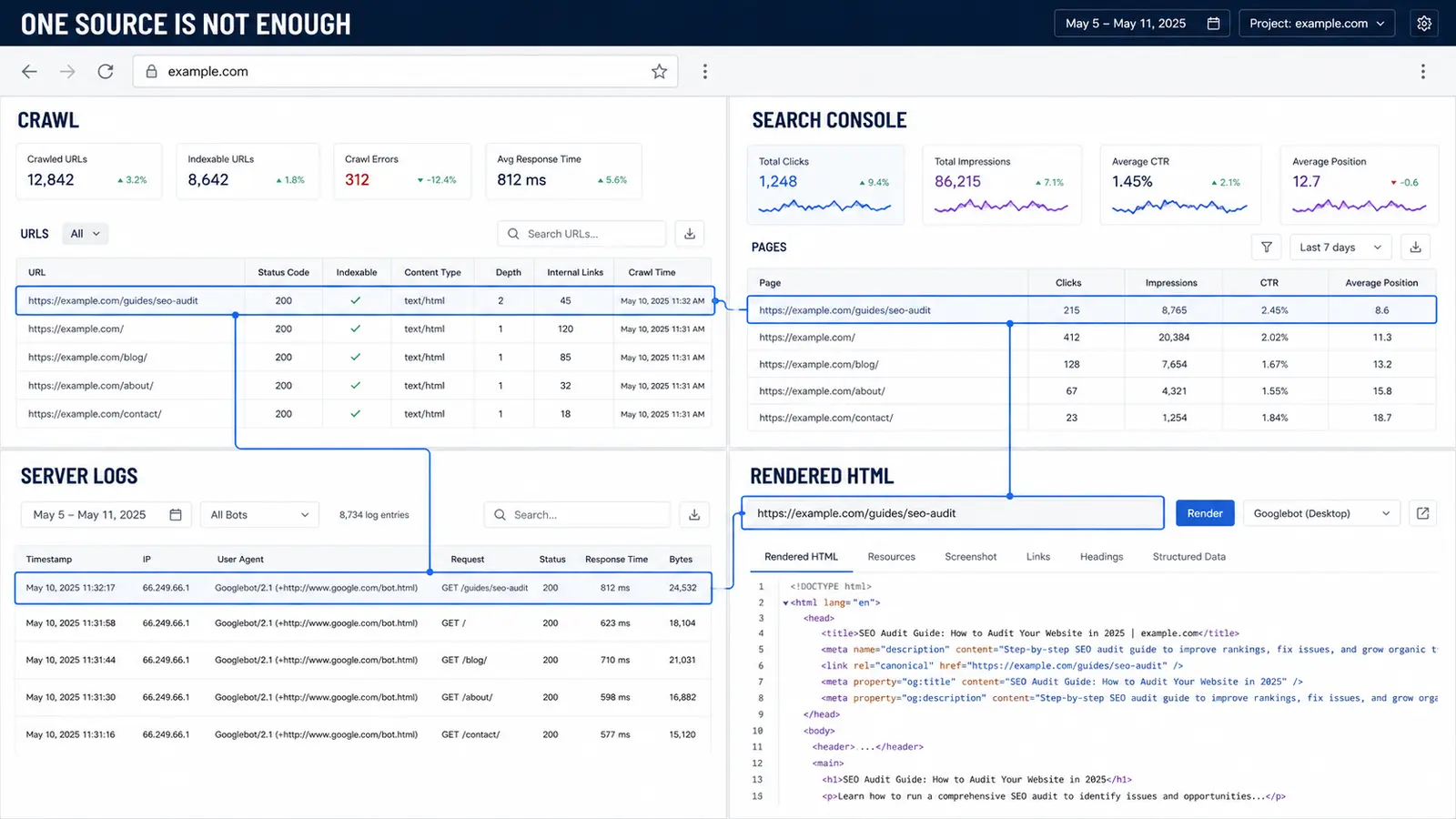
Build a working URL set from several sources: the crawl, XML sitemaps, Search Console landing pages, analytics landing pages, backlinks, CMS exports and known campaign URLs. Reconcile the lists instead of treating the crawl total as the number of pages the business owns.
For large websites, sample intentionally by template and state. Include a product page, category, article, pagination page, filtered URL, translated version and any JavaScript-dependent template. Add examples that are indexed, excluded, redirected and returning errors. Random sampling can miss a rule that affects an entire commercial section.
Where rendering matters, compare the original HTML with the rendered DOM. Then confirm important discrepancies through browser inspection or Search Console URL Inspection. A crawler setting is not evidence of what Google definitely indexed. Likewise, a temporary 429 or 503 response during an aggressive crawl may reflect the test configuration rather than normal availability.
In one B2B software project, the visible pages looked normal while a large share of crawling activity was tied to scripts and supporting resources. The site used an old, unfamiliar CMS, so a standard list of titles and status codes could not answer the real question. Comparing the delivered HTML, rendered output and crawl behaviour showed where a platform-level investigation was needed. The lesson is not that JavaScript is automatically bad; it is that an audit must examine how the actual implementation behaves.
We have also seen custom bot-protection rules catch legitimate crawlers and even real users. A third-party crawl alone cannot prove this. Server responses, logs, Search Console observations and controlled requests have to be compared before recommending that protection be removed or changed.
3. Applying the Same SEO Checklist to Every Website
The checklist keeps the analysis systematic, but it should not dictate priorities. Use it to prevent blind spots, then connect every material observation to actual page types and business objectives.
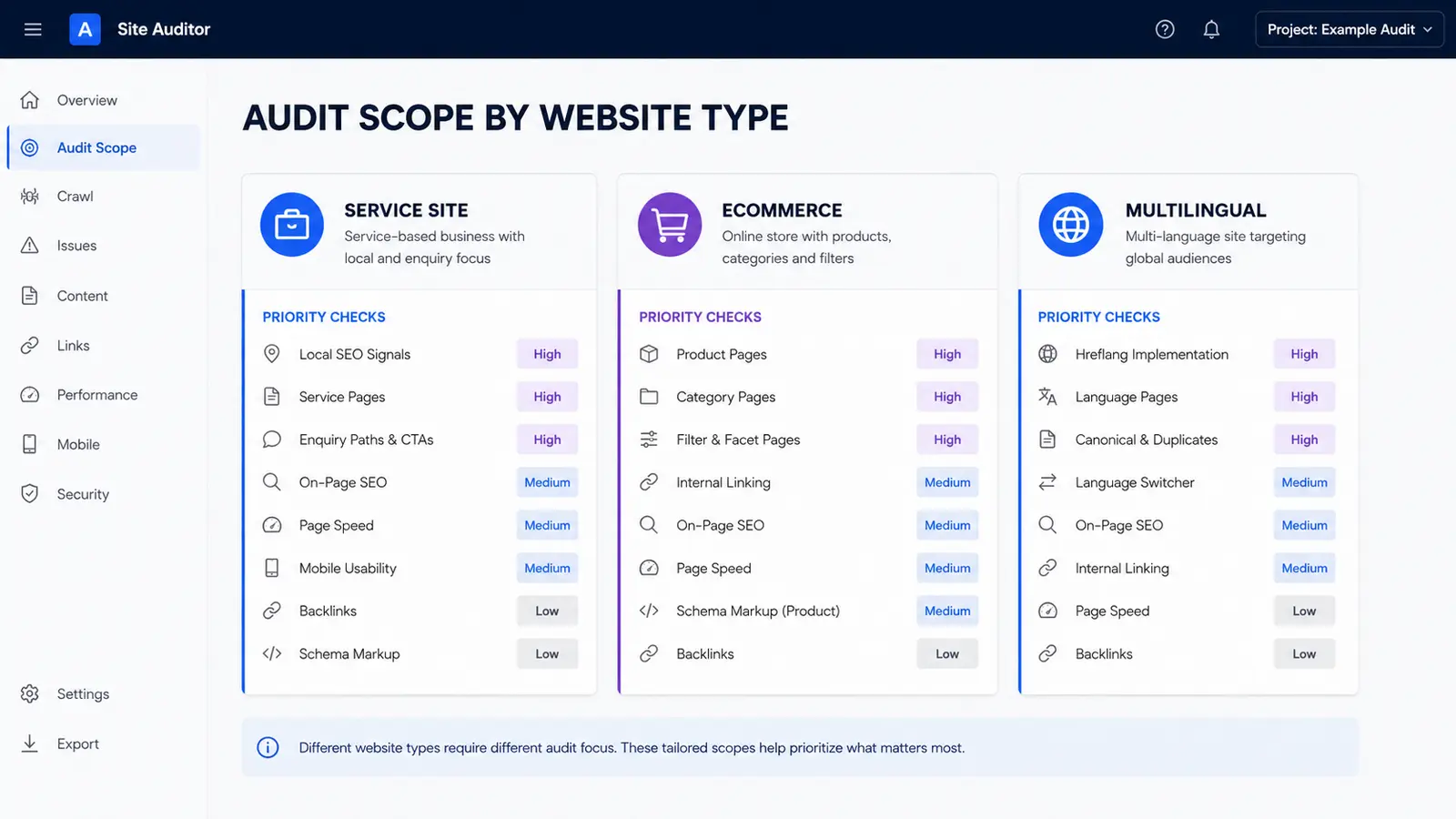
A service website, an ecommerce catalogue and a multilingual publication do not deserve identical depth in every category. Sample by template and business role. On one project, several copies of an old website were accessible from different folders. Checking a few random pages would have missed the pattern; mapping the directory variants exposed a duplication problem that required cleanup and redirects at the source.
| Audit area | Core questions | Useful evidence |
|---|---|---|
| Crawling and indexation | Can search engines discover and index the intended URLs? Are exclusions deliberate? | Crawl, robots.txt, sitemaps, Search Console, logs |
| Architecture and internal links | Can users and crawlers reach priority pages through meaningful paths? | Click depth, link graph, navigation and breadcrumbs |
| Rendering and performance | Is essential content present reliably? What slows real user journeys? | Raw/rendered HTML, field data, lab diagnostics |
| On-page signals | Do titles, headings, canonicals and copy represent the page accurately? | Template samples, SERPs, source code |
| Content and intent | Does each important page answer a real search and business need? | Queries, competitors, conversions, content inventory |
| Structured data | Does valid markup describe visible, eligible content without contradictions? | Rendered markup and validation results |
| International SEO | Are language and regional pages accessible, distinct and correctly connected? | hreflang sets, canonicals, redirects, localisation review |
| Off-page signals | Which pages earn relevant links, and are harmful patterns or lost targets present? | Backlink sources, linked-page status, brand mentions |
Not every excluded URL is an error. Redirected pages, deliberate noindex pages and alternate URLs with an appropriate canonical may be functioning as designed. Investigate unexpected exclusions on pages intended to rank. Google’s documentation also notes that crawling resources are primarily a concern for very large or rapidly changing sites; most smaller sites should focus first on crawlability and indexation basics. See Google’s crawl budget guidance and Klucco’s crawl budget guide.
Performance requires similar restraint. Core Web Vitals can support page experience, but a lab score is not a complete SEO strategy. Use field data where available, identify the affected template and connect the technical cause to the user journey. Google recommends good Core Web Vitals but states that good scores alone do not guarantee top rankings. Its Core Web Vitals documentation provides the current metric thresholds and context.
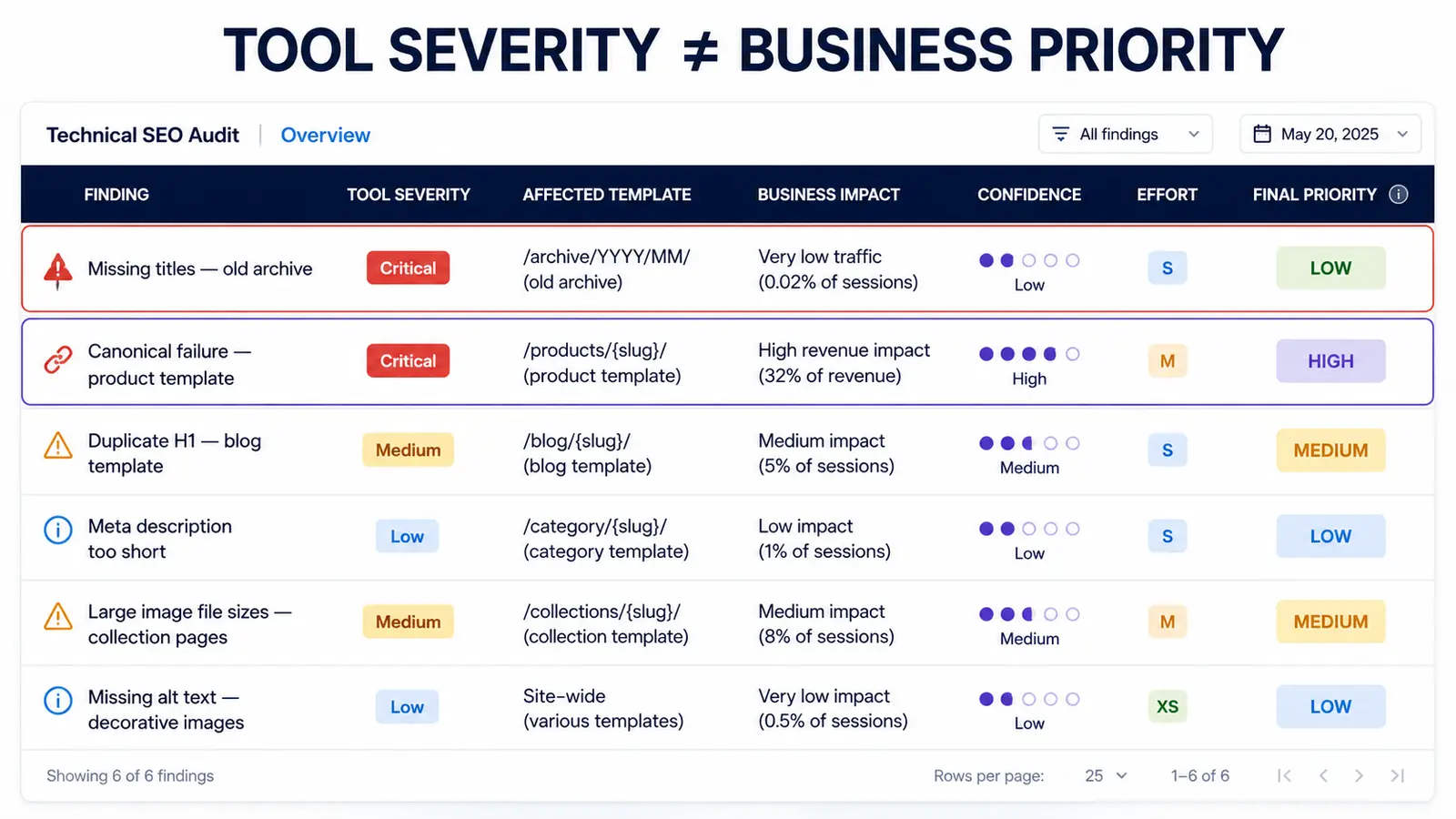
4. Using Tool Severity as the SEO Priority
A tool can label an issue critical, but it does not know which template generates revenue, which section is being retired or which pages the sales team uses. Prioritise validated findings by business impact, affected scope, confidence, effort, risk and timing.
The final deliverable works best as two connected layers: a concise decision document and a detailed findings register. This keeps the executive summary readable without removing the evidence specialists need.
| Report section | What it should contain | Primary reader |
|---|---|---|
| 1. Executive summary | Current situation, three to five priorities, expected outcomes and key risks | Decision-makers |
| 2. Scope and methodology | Properties, markets, dates, tools, sample design, access and limitations | Everyone |
| 3. Performance baseline | Search demand, visibility, landing pages and conversions with comparison periods | Marketing and leadership |
| 4. Prioritised roadmap | Initiatives by sequence, owner, effort, dependency and target outcome | Project owners |
| 5. Findings register | One reproducible record per issue or opportunity | SEO, development and content |
| 6. Validation plan | Acceptance criteria, monitoring method and review date | Implementers and QA |
| 7. Appendix | URL exports, raw samples, definitions and supporting screenshots | Specialists |
The executive summary should not list every warning. Explain the few conditions materially limiting performance, what the business can do about them and what requires further investigation. State uncertainty plainly. “Search Console shows fewer indexed product pages after the template release; the canonical output is a likely contributor” is more credible than claiming a single cause without verification.
Keep raw exports in an appendix or separate workbook. Decision-makers should not need to scroll through 10,000 URLs to find the recommendation, while developers should still be able to filter the affected population. Link each roadmap item to its detailed finding so the reasoning remains traceable.
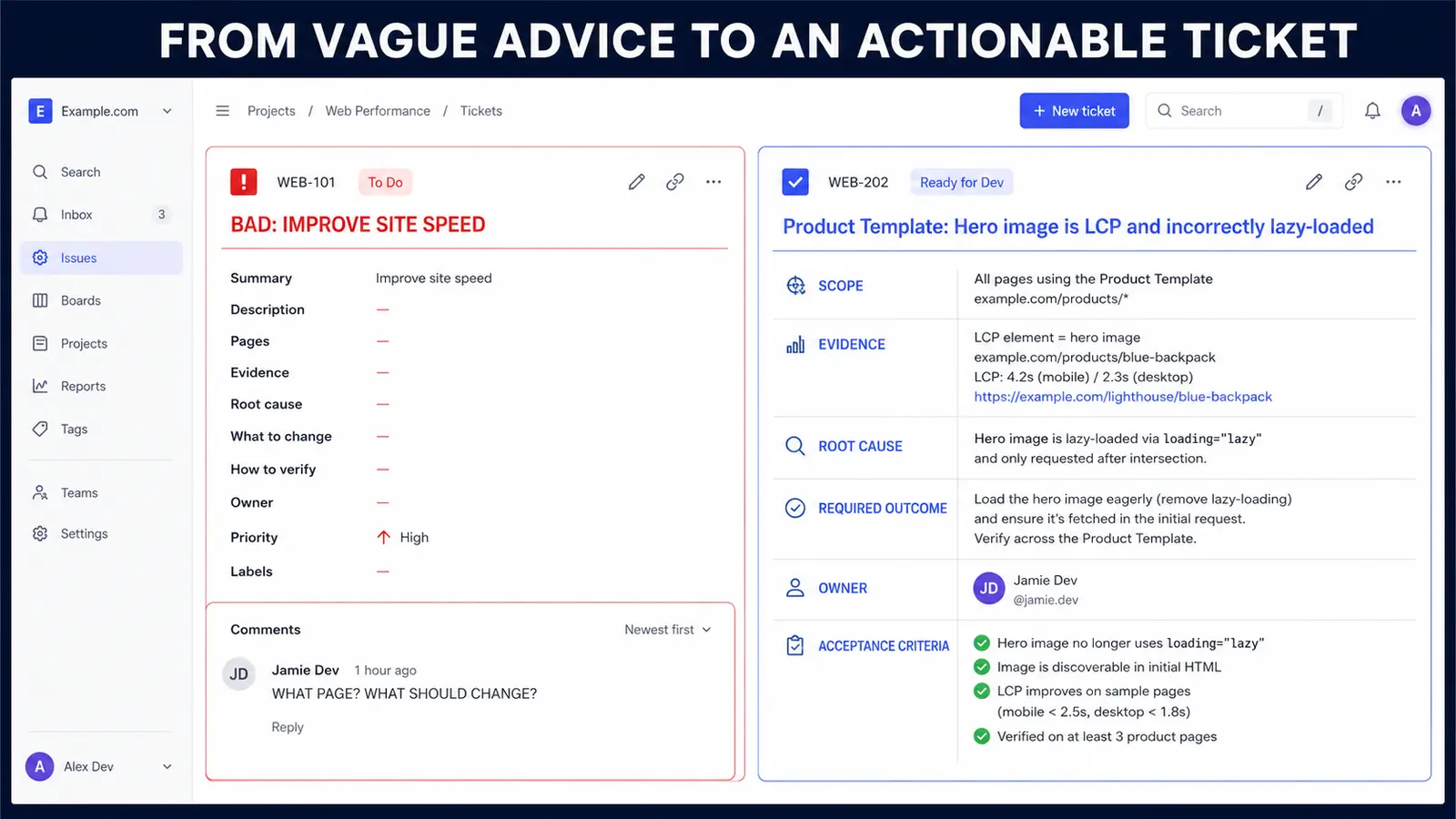
5. Writing Recommendations Nobody Can Implement
Each finding should be understandable without a meeting. The exact spreadsheet columns may vary, but the underlying information should remain consistent.
| Field | What to write |
|---|---|
| Finding ID and title | A stable reference and a specific description |
| Affected scope | Templates, URL pattern, sample URLs and estimated population |
| Observed behaviour | What happens now, without assuming the cause |
| Evidence | Reproduction steps, source, date and supporting data |
| Root cause | Validated cause or clearly labelled hypothesis |
| Impact | Search, user and business consequences; affected priority |
| Required outcome | The state that should be true after the change |
| Owner and dependencies | Responsible team and work that must happen first |
| Effort and priority | Relative estimate agreed with the implementer |
| Acceptance criteria | Observable pass conditions and verification method |
Avoid hiding several causes inside one row called “technical SEO issues.” Separate findings when different teams, fixes or acceptance tests are required. Conversely, group thousands of URLs when one template rule causes the same behaviour. The unit of work should match the unit of implementation.
6. Reporting the Symptom Instead of the Root Cause
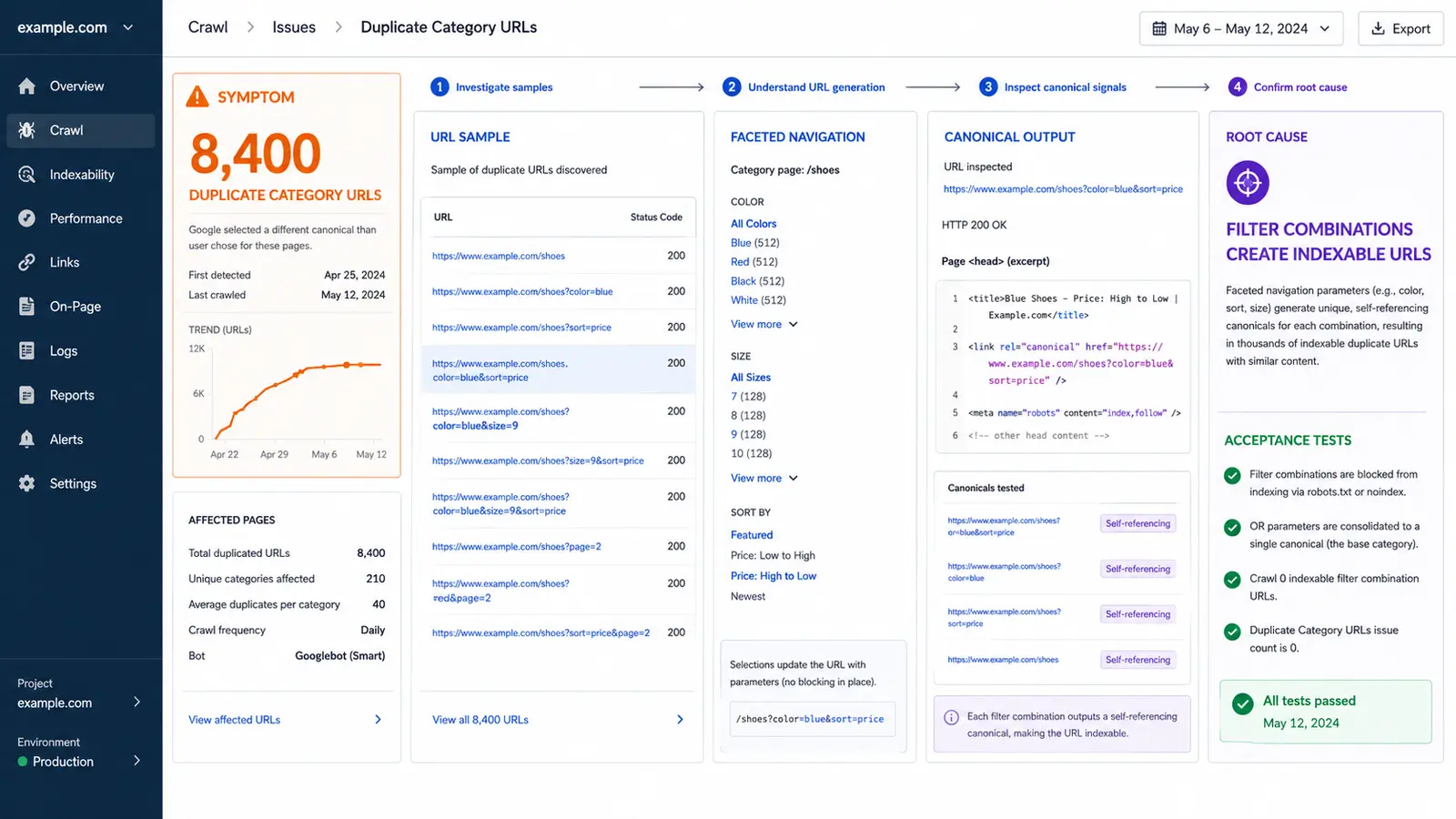
Imagine a crawler reports 8,400 duplicate category URLs. That number is an observation. The report still needs to establish where the URLs come from, whether Google discovers them, what they do to navigation and which rule produces them.
Example finding: Filter combinations generate indexable duplicatesScope: Product listing templates under /shop/; 8,400 crawlable parameter URLs observed.
Evidence: Selecting colour and sort options creates separate URLs with self-referencing canonicals. Internal filter links expose them; Search Console samples show Google discovered part of the set.
Impact: Crawling and internal signals spread across near-duplicate listings while three priority categories receive weaker internal support.
Required outcome: Only approved landing-page combinations remain indexable and internally promoted. Other combinations stay usable for shoppers without creating unintended search landing pages.
Acceptance criteria: Approved samples return 200 with self-referencing canonicals and remain in the sitemap. Non-approved samples follow the agreed crawl/index behaviour. Navigation still exposes products, and regression tests pass on mobile and desktop.
The auditor can suggest implementation options, but the development team should confirm the safest method for the platform. Prescribing one plugin or robots rule without understanding dependencies can create a second problem. Define the outcome and constraints first.
7. Hiding Subjective Judgement Behind a Precise Score
Tool severity is not business priority. A missing title on a retired archive can be less important than a canonical error on a high-margin product template. Rank validated findings using factors the tool cannot know.
- Impact: How strongly could the condition affect discovery, indexation, visibility, users or conversions?
- Reach: Which templates, markets and valuable journeys are affected?
- Confidence: Is the cause proven, supported or still a hypothesis?
- Effort: What do the responsible teams estimate, including testing and dependencies?
- Risk: What could break if the change is wrong, and is it reversible?
- Timing: Does a redesign, campaign or release create a deadline or an opportunity?
A simple High/Medium/Low scale is often more honest than a formula producing 87.4 points from subjective inputs. Define what each level means for this website. Have development estimate effort; an SEO should not guess how difficult an unfamiliar codebase is to change.
8. Delivering Findings Without Owners or Sequence
After prioritisation, combine related findings into initiatives. A “product indexation” initiative might include template canonicals, internal category links and sitemap rules. This is easier to budget and manage than dozens of disconnected spreadsheet rows.
Sequence dependencies visibly. Measurement should work before the team evaluates conversion changes. A new URL structure should be approved before writers replace internal links. A template fix should be tested before the same page type is regenerated at scale.
Use three practical horizons rather than promising arbitrary ranking dates:
- Protect now: access, indexation, availability, tracking and other critical failures.
- Improve next: validated structural and content constraints with clear owners.
- Test and learn: opportunities that require evidence before wider investment.
Attach the expected outcome, responsible owner, dependency, acceptance test and review date to every initiative. “Q4 SEO improvements” is not a roadmap item. “Correct canonical generation on product templates; owned by web development; validate on staging and monitor indexed product set after release” is.
Need decisions, not another automated score?
Klucco reviews the evidence, identifies the causes that matter and turns SEO findings into work your team can estimate and verify.
9. Auditing Pages in Isolation and Ignoring Site Architecture
A page can have a good title, useful copy and a self-referencing canonical while the website structure still prevents it from performing. If the audit evaluates URLs one by one, it can miss orphaned pages, excessive click depth, overlapping sections and navigation that does not represent how customers search or choose.
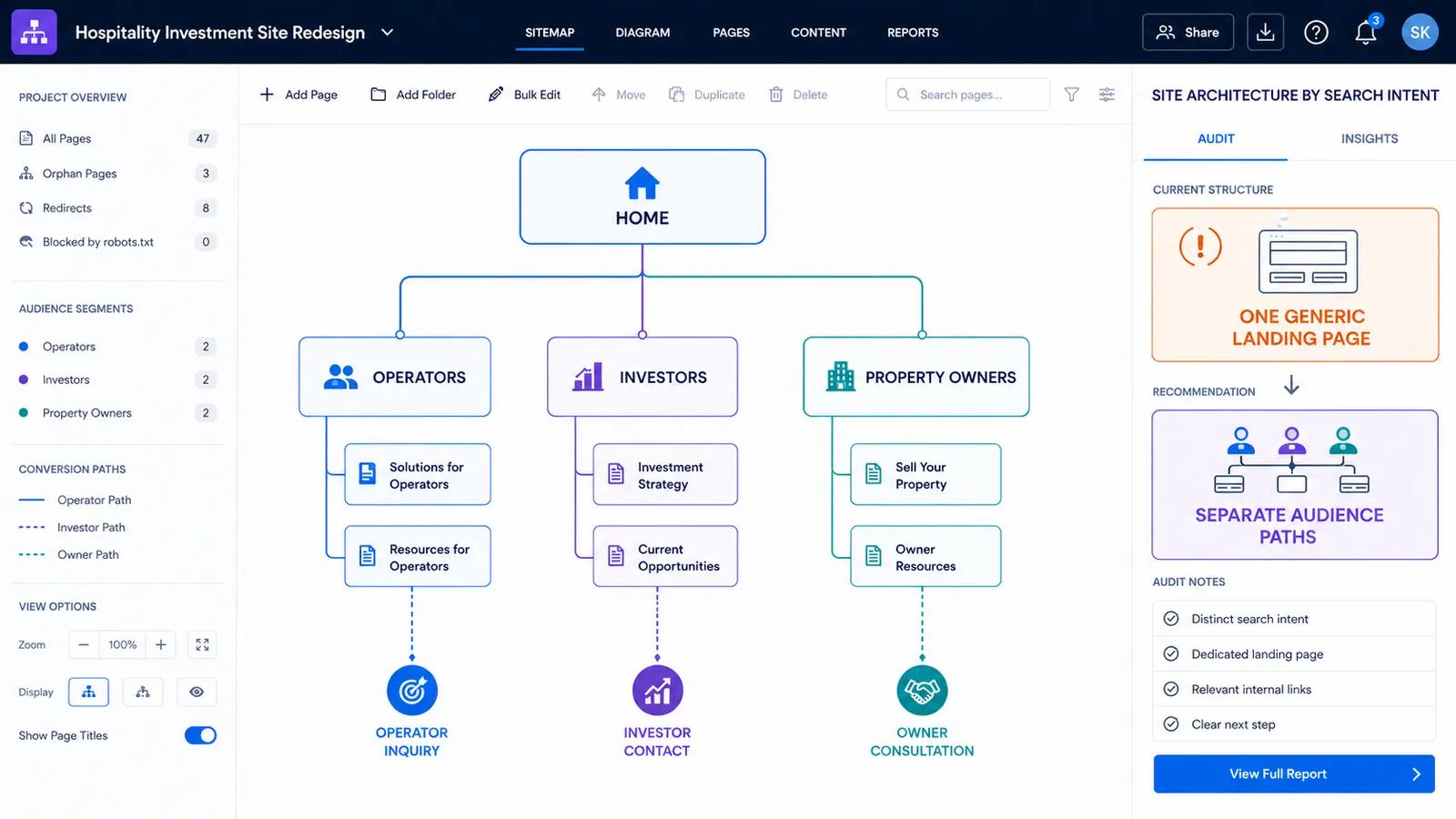
Analyse the relationships between templates. Which pages link to priority services and categories? Can crawlers reach products without relying on an XML sitemap? Do breadcrumbs, hubs and menus reinforce the intended hierarchy? Check whether several pages compete for the same role or whether one broad page is expected to serve audiences with fundamentally different needs.
In one project, a new business model had almost no obvious search competitors and limited conventional keyword data. A structural analysis still revealed three distinct audiences: companies seeking an apartment operator, investors evaluating the model and property owners considering a lease. Treating them as one generic landing page would have mixed different questions and conversion paths. The resulting recommendation was to create a clear site branch for each audience and connect each branch to the relevant proof and next step.
This is a site-architecture finding rather than a separate marketing “growth hack.” It belongs in the audit because information architecture controls internal linking, topical relationships, crawl paths and the pages available to match different search intents.
Architecture check:
For every priority audience or product group, identify its entry page, supporting pages, internal link sources and intended conversion path. If any component is missing, the recommendation should describe the structural gap—not simply ask for “more content.”
10. Treating Delivery of the Report as the End of the Audit
Validation begins before the report is delivered. Reproduce the issue, check representative templates and confirm the proposed outcome does not conflict with navigation, analytics, commerce or international requirements. For risky changes, recommend a staging test or limited release.
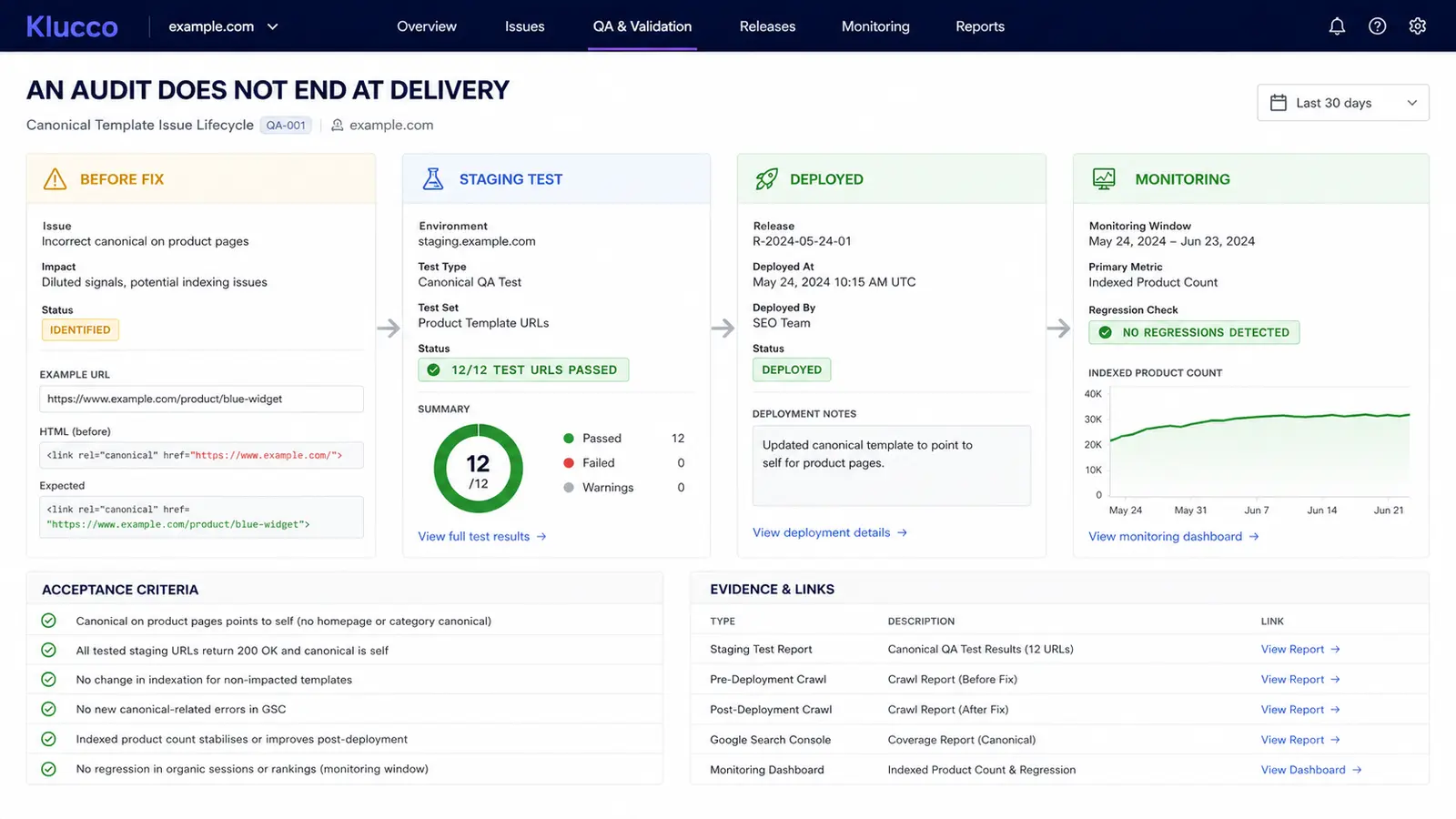
Acceptance criteria should describe observable behaviour. Instead of “fix structured data,” require the intended schema to match visible content on specified templates, contain the required properties and pass the agreed validation. Instead of “improve internal linking,” identify which priority pages must receive contextual links from which relevant templates.
After implementation, retest both the corrected condition and likely side effects. A canonical change may validate technically while removing useful pages from a sitemap. A performance change may improve LCP while breaking analytics. QA should follow the complete user and crawler journey.
Separate deployment confirmation from outcome monitoring. Developers can verify that the code meets acceptance criteria immediately. Search recrawling, indexation and demand take their own time. Record the release date and monitor the affected page group; do not invent a universal deadline for rankings to improve.
Measure the Audit by Implementation and Business Outcomes
An audit is not successful because it contains many findings. Track the percentage of accepted recommendations that are scoped, implemented and validated. Record blockers and rejected items with reasons. This reveals whether the report was usable and whether the organisation had the capacity to act.
Then monitor the technical and search outcomes attached to each initiative: intended pages indexed, error rates reduced, priority crawl paths accessible, canonical clusters corrected or content gaps filled. Use relevant page groups and queries rather than relying only on total organic sessions.
Keep the comparison method stable and annotate website releases. A change in seasonality, search demand or the set of analysed URLs can otherwise be mistaken for the effect of a technical recommendation.
Some fixes protect existing performance rather than create an immediate uplift. Preventing a staging noindex from reaching production has enormous value even though there is no “before decline” to graph. Report avoided risks separately from growth experiments.
SEO Audit Report Template: Copy This Structure
The following compact template can be transferred to a document and spreadsheet. Adapt the terminology to the team that will use it.
Decision document
- Objective and business context
- Scope, access and limitations
- Performance baseline
- Top findings and why they matter
- Prioritised roadmap, dependencies and owners
- Validation and monitoring plan
Findings register
ID | Finding | Scope | Evidence | Cause or hypothesis | Impact | Required outcome | Owner | Effort | Priority | Dependency | Acceptance criteria | Status
Add an evidence link and review date where the team needs them. Use controlled dropdown values for priority, owner and status, but leave enough space to explain the reasoning. A template should increase consistency, not reduce every finding to a colour.
Final SEO Audit Quality Check
- The objective, scope, date ranges and limitations are explicit.
- Important page templates and markets are represented.
- High-priority findings were reproduced and validated.
- Observations, causes and hypotheses are clearly distinguished.
- Priorities reflect business impact, confidence, effort, risk and timing.
- Every accepted recommendation has an owner and required outcome.
- Developers and writers can estimate the work without guessing the scope.
- Acceptance criteria test the result and relevant side effects.
- Raw data remains accessible without overwhelming the main report.
- The roadmap accounts for dependencies and available capacity.
If any of these conditions is missing, the audit may still contain useful research, but it is not yet ready to guide implementation.
Turn your SEO audit into a workable roadmap
Tell Klucco what your website needs to achieve. We can assess the technical and content constraints and organise the findings around your team’s priorities.
Frequently Asked Questions
