

You started your business to solve problems and generate revenue, not to decode search engine algorithms. Yet here’s the brutal reality: invisible on Google means invisible to customers.
Five years in the SEO industry taught me one lesson: gorgeous websites generating zero leads outnumber successful ones ten to one. Imagine owning an outstanding restaurant in a prime location, but it’s tucked in a basement with no sign, no street number, and unlisted on every map. On-page SEO puts your storefront on the busiest corner with a neon sign.
What Is On-Page SEO?
On-page SEO is the practice of optimizing individual pages on your website to rank higher in search engines and attract the right audience. It includes everything you directly control on your site – from content and structure to technical elements.
Core On-Page SEO Elements:
- Content quality – valuable information that answers user questions
- Keywords – strategic placement of terms people actually search for
- Title tags and meta descriptions – what users see in search results
- Headings structure – organized H1, H2, H3 hierarchy
- URL structure – clean, descriptive page addresses
- Internal links – connections between your pages
- Images – optimized file sizes and descriptive alt text
- Page speed – fast loading times
- Mobile optimization – seamless experience on all devices
When someone types “industrial pump supplier Germany” into Google, they’re not browsing – they’re hunting for a solution. On-page optimization raises your hand and says: “I’m your answer.”
Here’s why this matters: Google Ads charge per click – some keywords cost €5, others €50, and competitive B2B sectors like legal or enterprise software can reach €200 per click. The moment you stop paying, the traffic stops.
On-page SEO works differently. It brings organic traffic without paying for each click. Done right, it compounds over time. A well-optimized site can see organic traffic increase by 300% while cost per lead drops by 60% – delivering sustainable growth without the constant ad spend.
What Is On-Page Content?
On-page content includes everything visitors see on your page. We break it down into four types: text, images, videos, and audio. The primary goal is simple – answer the user’s question.
Back in 2016, we saw firsthand how search engines rewarded pages packed with multiple content types. More variety meant better rankings – it was that straightforward. Today, based on our work at Klucco with hundreds of client sites, the game has fundamentally changed.
What drives rankings now isn’t content variety – it’s content quality. Search engines evaluate usefulness (does it solve the user’s problem?), expertise (does it demonstrate real knowledge?), structure (is it easy to scan and understand?), and uniqueness (does it offer something competitors don’t?). Pack your page with videos and images, but if the content lacks substance or fails to answer the search intent, you won’t rank.
On-Page SEO vs. Off-Page SEO
On-page SEO is everything you do inside your website—optimizing text, improving page structure, internal linking between pages.
Off-page SEO is everything outside your site—backlinks from guest posts, mentions in discussions or social media.
Let’s break down the key differences:
| On-Page SEO | Off-Page SEO |
| Content optimization | Backlinks from other sites |
| Internal linking | Guest posts |
| Page titles and meta descriptions | Social media mentions |
| Site speed | Online reviews |
| Mobile optimization | PR coverage |
| URL structure | Brand mentions |
We always recommend starting with on-page SEO. It’s the foundation for your site’s growth, and it needs to be solid. Without a strong foundation, all your SEO efforts won’t deliver lasting results.
Why On-Page SEO Matters
On-page SEO delivers long-term organic traffic without paying for each click. While paid ads stop the moment you stop paying, properly optimized pages continue bringing visitors for months and years.
💡 In one of our cases at Klucco, we worked with an agricultural equipment site. Two years after we ended our collaboration, it still holds the #1 position in Google and receives significant organic traffic.
Search has evolved. Google now shows featured snippets, AI Overviews, People Also Ask boxes, and local map packs. AI tools like ChatGPT and Perplexity cite sources when answering questions. Proper on-page optimization gets your content featured across these formats. Think of it like sales channels – one channel is good, but two or three channels working together? Even better.
User experience and SEO work together. We often see sites ranking in the top position in narrow niches with zero on-page optimization – slow loading, poor structure, weak content. They rank simply because competitors haven’t optimized either. Proper on-page optimization gives you the chance to outrank these competitors without spending a large budget.
How to Do On-Page SEO: Foundation Checklist
On-page SEO isn’t a one-time task – it’s a systematic process. Below, we’ve broken down the essential elements every page needs to rank well and convert visitors. This checklist covers:
- Creating content that answers real questions
- Strategic keyword placement
- Optimizing title tags and meta descriptions
- Structuring pages for easy navigation
- Building clean URLs
- Internal and external linking
- Image optimization
- Mobile-first design
- Keeping content fresh and up-to-date
Let’s dive into each element.
1. Write Content That Actually Answers Questions
Unique and useful content that answers the user’s question is critical.
Before Google AI Overviews, “evergreen content” was king – informational articles like “How to choose…”, “What is…”, or “How to make…” stayed relevant for years. But in the AI era, users increasingly skip websites altogether. AI tools like ChatGPT, Perplexity, and AI Overviews generate instant answers without taking the user’s precious time.
This is why expert content matters now more than ever. You need thorough keyword research, a deep understanding of your target audience, and insight into how they search for answers.
💡 Think about it: it would be absurd for a car dealership website to publish content about Apple products or home appliance repair.
We consistently notice that sites producing content in their actual area of expertise – showcasing what makes their business unique from hundreds of other websites – dominate the top search results.
2. Position Keywords Where They Work
Keyword placement plays a major role in on-page SEO. First principle: content is written for people, with keywords naturally integrated.
We often see a common mistake – people write the text first, then stuff keywords in afterward. This is a losing strategy by default.
Where to Place Keywords:
- H1 heading – your main keyword should appear here naturally
- First paragraph – establishes what the page is about immediately
- Subheadings (H2, H3) – use related keywords and variations
- URL slug – keep it clean and keyword-focused
- Image alt text – describe images using relevant keywords
Keywords need to be distributed organically throughout the content, along with LSI (Latent Semantic Indexing) keywords – related terms and synonyms that support your main keyword. For example, if your main keyword is “digital marketing,” LSI keywords include “online advertising,” “content strategy,” “SEO,” and “social media campaigns.” This helps search engines understand your content’s context more clearly.
Natural placement is key. Forcing keywords into every sentence doesn’t help – it hurts readability and credibility.
3. Craft Title Tags That Demand Clicks
Title tags are the blue clickable links in search results – often your only chance to win a click over competitors.
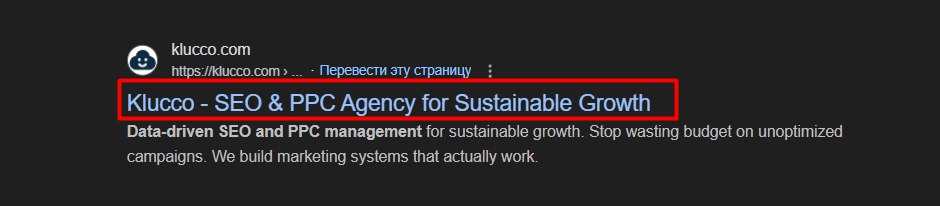
A strong title tag clearly tells both search engines and users what your page offers. It appears in browser tabs, search results, and even AI tool citations. More importantly, a properly optimized title tag directly impacts your ranking position in search results.
Title Tag Best Practices:
- Keep it between 50-60 characters to avoid cut-off
- Include your target keyword naturally
- Make each page’s title unique
- Write something compelling that makes people want to click
Example:
❌ Bad: “Welcome to Our Website | Acme Industries”
What do they even do? Wasted opportunity.
✅ Good: “Industrial Automation Solutions for Manufacturing | Acme Industries”
Clear, specific, 58 characters. Shows exactly what users will find.
A well-crafted title tag can increase click-through rates by 30-50% without changing your ranking position.
4. Write Meta Descriptions That Convert Browsers into Clickers
Meta descriptions are the text snippet below your title in search results. They don’t affect rankings, but they directly impact your click-through rate (CTR).
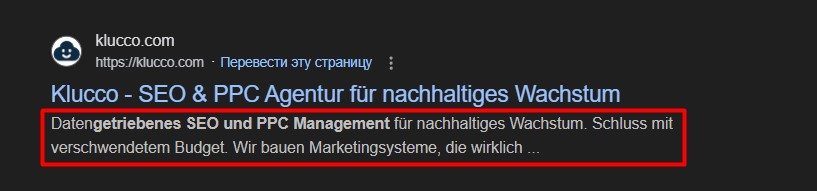
Write your meta description as compelling as possible – it’s your chance to sell the click. Add a “wow” factor: specific benefits, numbers, urgency, or a clear reason to choose your page over competitors’.
The better your description matches what users are searching for and previews what they’ll find, the more clicks you’ll get.
Example:
❌ Generic: “We offer quality products and excellent service.”
✅ Compelling: “Buy laptops with free delivery in 24 hours. 500+ models in stock. 2-year warranty included.”
A well-written meta description can significantly increase the traffic you get from the same ranking position.
Important to understand: search engines can modify your title tags and meta descriptions in SERP to better match user queries – they pull text directly from your page content. This means claiming exact CTR improvements from metadata alone isn’t entirely accurate. Remember – all optimization works together as a system.
5. Structure Pages So Humans and Algorithms Can Navigate
Structure your content using H1-H4 headings. This helps users navigate easily, and allows search engines and LLM systems to understand your content better.
Use proper text structure so AI services and search engines can cite your content correctly. This increases CTR and drives additional clicks from different organic channels.
How to Use Headings:
- Use H1 for your page title – remember, only one H1 per page
- Use H2s for main subtopics – these are your major sections
- Use H3s nested under H2s – for detailed sections within subtopics
- Use deeper subheadings (H4, H5) – for even more specific information
Create headings with keywords, but make them self-sufficient and clear – not vague. Each heading should carry specific information and value.
Additionally, look at featured snippets in search results and “People Also Ask” boxes. They show you exactly what users want to see in their answers and which headings search engines and LLM bots cite most often. Use these insights to structure your headings and content more effectively.
6. Clean URLs Build Trust and Rankings
URL structure influences both search visibility and user trust. Clean, descriptive URLs help search engines categorize your content accurately while signaling professionalism to users.
What Makes a Good URL:
- Short and descriptive
- Includes target keyword
- Easy to read and remember
Examples:
✅ Good: yoursite.com/guide/choosing-crm-software
Clear, informative, shareable
❌ Bad: yoursite.com/p=9847&category=blog&id=crm
Confusing, looks suspicious, provides zero context
A clean and structured URL signals trust on a psychological level – it shows users this is a legitimate site, not spam.
URLs appear in search results, emails, and social shares – they influence whether people click. A clean URL structure reinforces your professional brand, just like a professional email address does.
If your site has messy URLs with random parameters, fixing them requires technical SEO knowledge and proper 301 redirects to preserve your existing rankings.
7. Internal Links Guide Users and Distribute Authority
Adding internal links helps connect your content logically and helps users find the information they need. Use internal linking to boost your site’s rankings – when one page mentions another, it passes authority and strengthens that page’s position.
Use anchor text strategically. Anchor text is the clickable text in a link that tells both users and search engines what the linked page is about.
Here’s an important point: you can’t always use commercial keywords when other sites link to you. For example, commercial anchors in guest posts are often flagged by Google – the search bot recognizes these aren’t helpful information for users, but pages trying to sell something.
However, these commercial queries are often highly converting. Internal linking is your best tool for promoting such keywords without triggering spam filters.
8. External Links to Authorities Build Your Credibility
Linking to authoritative external sources strengthens your content. It proves thorough research, supports claims with credible data, and builds trust with readers.
What to Link:
- Original research and academic papers
- Government data and official statistics
- Industry reports from recognized authorities
- Established thought leaders
What to Avoid:
- Random blogs with questionable credibility
- Suspicious sites that could harm your reputation
- Direct competitors for keywords you’re targeting
Use “open in new tab” so visitors stay on your site.
Monitor Your Links:
Always check for broken links – links leading to non-existent pages. While you can control internal links on your site, you can’t control external ones. Regularly identify broken external links and replace them with relevant alternatives to avoid losing authority with search engines.
9. Images Need Optimization or They Kill Conversions
Images boost engagement, but unoptimized images slow down your site and hurt conversions.
Image Optimization Essentials:
- Compress file sizes – reduce image size by 60-80% without visible quality loss
- Use modern formats – WebP compresses better than JPEG
- Size appropriately – match image dimensions to display size
Alt Text:
Alt text tells search engines what the image shows. Use relevant keywords in your alt text – it affects rankings. Image title text does not impact rankings.
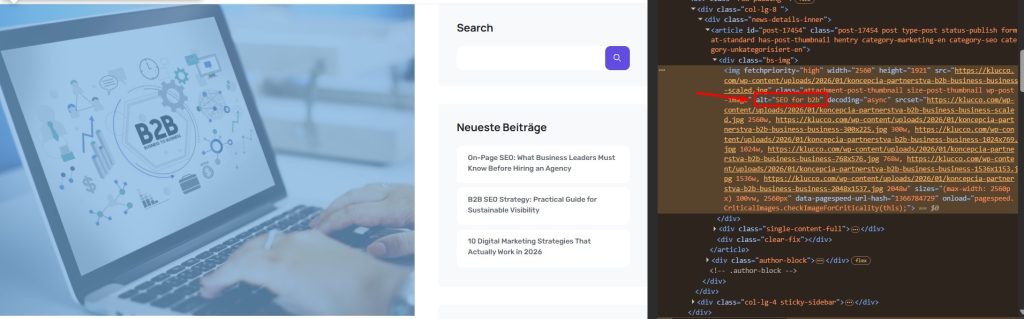
Many site owners don’t realize that unique, properly optimized images are an additional traffic channel. Images have their own positions in search results. Proper optimization can bring you traffic from Google Image Search.
Over 60% of searches happen on mobile devices, and the percentage keeps climbing. Google implemented mobile-first indexing in 2019 – primarily using mobile site versions for ranking, even for desktop searches. Poor mobile experience tanks overall search visibility regardless of desktop polish.
Mobile optimization means responsive design adapting smoothly to any screen size, touch-friendly buttons and navigation, readable text without pinch-zoom gymnastics, fast loading on cellular connections, and zero intrusive pop-ups blocking content.
Test immediately: grab your phone, visit your website. Navigate easily? Find services quickly? Read content without squinting or zooming? Complete contact forms without frustration? Any difficulty means losing mobile customers daily – more than half your potential traffic.
Use Google Lighthouse: Open Chrome DevTools (F12), go to the “Lighthouse” tab, and run a mobile audit. It shows exactly what’s broken and how to fix it.
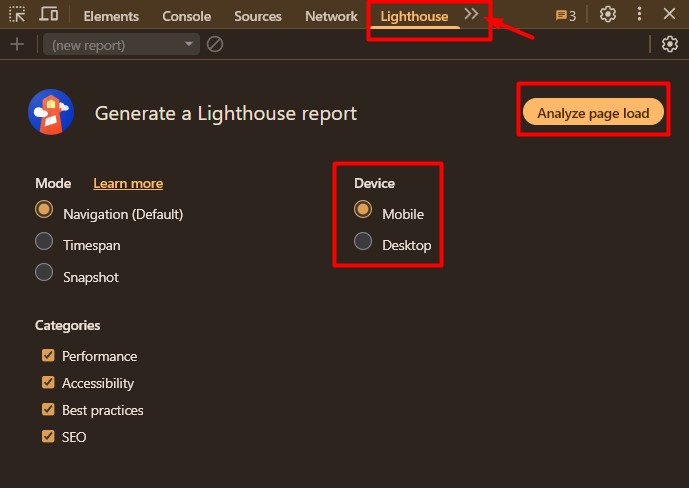
Common mobile killers: text requiring zoom to read, buttons packed too tightly for accurate tapping, forms malfunctioning with mobile keyboards, pop-ups refusing to close on small screens, images taking thirty seconds to load. Each problem bleeds conversions from over half your traffic.
11. Fresh Content Maintains Rankings and Authority
Search engines favor recently updated content, especially in rapidly evolving industries. That 2020 guide you published? Outdated. Statistics shifted, best practices evolved, new regulations emerged, technology advanced. Stagnant content signals unreliability to search engines.
Strategic maintenance involves quarterly audits: identify outdated information, update statistics with current data, refresh screenshots, add sections covering recent developments, archive genuinely obsolete content.
Critical rule: don’t just change the date, metadata, and H1. Make real updates to the content so search bots actually see changes on your page. This increases your content’s authority, positively affecting both search engines and LLM bots.
As an agency, we often encounter outdated content on sites. Sometimes one article brings 90% of traffic and conversions. But because the content isn’t fresh, the page loses positions, and the site owner thinks something’s broken with the site. The answer is right there and simple – update your content.
Advanced On-Page SEO Tactics
Once you’ve mastered the fundamentals, it’s time to go deeper. Advanced on-page SEO techniques separate good sites from great ones – those that dominate search results and capture traffic competitors miss.
These tactics require more technical knowledge but deliver significant results:
- Optimize for Core Web Vitals and page speed
- Implement schema markup for rich results
- Structure content for AI and LLM systems
- Build E-E-A-T signals to prove expertise
Let’s break down each tactic.
Optimize for Page Speed
Core Web Vitals are Google’s performance metrics measuring user experience:
- Largest Contentful Paint (LCP) — measures main content load speed. Target: under 2.5 seconds.
- Interaction to Next Paint (INP) — measures response time to clicks and taps. Target: under 200 milliseconds.
- Cumulative Layout Shift (CLS) — tracks whether elements jump around during load, frustrating users trying to read or click. Target: under 0.1.
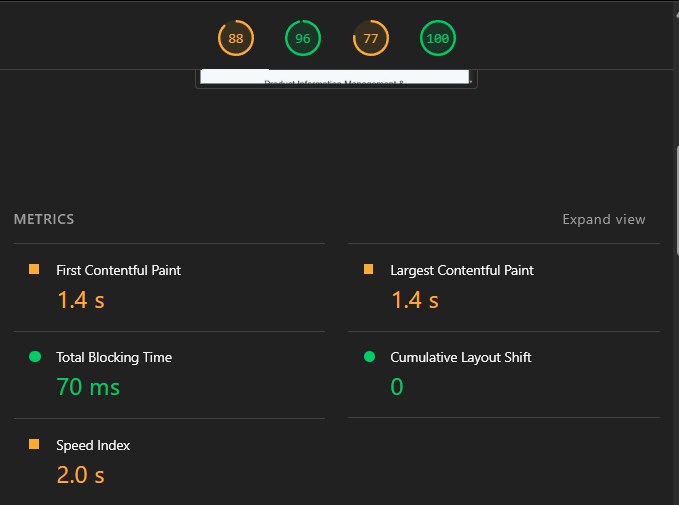
Page speed transcends SEO—it’s conversion bedrock. The criticality of speed varies depending on site type. E-commerce sites require faster loading for purchases, while local service sites can afford slightly slower speeds.
Amazon calculated every hundred milliseconds of delay costs them one percent in sales. Five-second versus two-second load time? Potentially massive conversion rate difference. That’s real money lost to slow speed.
Test your site: Use Google’s free PageSpeed Insights. Scores above 90: excellent. 50-90: needs optimization. Below 50: serious problems bleeding business daily.
Add Schema Markup
Schema markup is structured data code telling search engines exactly what page elements represent, eliminating algorithmic ambiguity. Important to understand: schema markup doesn’t directly affect your rankings – it impacts your click-through rate (CTR).
Enhanced listings with star ratings, pricing, availability, displayed FAQs, recipe details, event dates—all enabled by properly implemented schema. Rich results occupy more screen space, attract more attention, and generate measurably higher click-through rates than standard text listings.
Different Schema Types:
- Organization – communicates company details, logo, social profiles
- Local Business – critical for physical locations. Displays address, hours, contact info directly in results
- Product – enables pricing, availability, review stars in search results, dramatically boosting e-commerce clicks
- Article – helps search engines and LLM bots better understand content expertise, authorship, and publication details for blog posts
- FAQ – note: this markup type is no longer displayed in Google search results
In our experience working with an industrial supplies e-commerce site, we implemented product schema displaying pricing and availability in search results. Click-through rate surged forty-two percent despite unchanged rankings. More clicks from identical visibility through better presentation.
Apply LLM-Focused Optimizations
Google’s AI Overviews, ChatGPT, Perplexity now answer questions directly, citing sources instead of just listing links. Your content needs structuring so AI tools extract and cite you accurately.
AI is a trend that’s here to stay – all LLM systems are developing rapidly. Our team believes AI will soon reach the next level, implementing product sales through AI interfaces and opening a new branch in digital commerce. The key is to prepare now, so you’re not playing catch-up and can maximize the opportunity when it arrives.
Based on our research, there’s no guaranteed formula for getting cited in AI systems. However, quality content with clear structure performs better. Use definitive statements, include specific data points, and provide comprehensive coverage – not surface-level content.
E-E-A-T Signals Prove Expertise
Google prioritizes content from credible sources, especially for topics affecting health, finances, and safety – Your Money or Your Life (YMYL) categories. E-E-A-T stands for: Experience, Expertise, Authoritativeness, Trustworthiness.
Why it matters: E-E-A-T signals help search engines determine if your content is reliable and worth ranking. Strong signals boost visibility, weak signals hurt it.
On-Page E-E-A-T Signals:
- Author bios – establish relevant credentials and qualifications
- About page – clearly communicate your expertise
- Complete contact information – physical address and phone number
- Privacy policy and terms of service – prove legitimacy
- Client testimonials and case studies – specific, verifiable results
- Industry certifications – from recognized bodies
- Regular high-quality content – demonstrates deep knowledge
Every blog post needs a named author with credentials. Service pages should highlight certifications. Case studies should be detailed and specific.
Measure Your On-Page SEO Performance
On-page SEO delivers one of the highest marketing ROI when executed correctly and maintained consistently. It won’t replace quality products or strong sales, but it ensures your business is discoverable when customers search for solutions.
Key Metrics to Track:
- Organic traffic growth – track month-over-month and year-over-year trends
- Keyword rankings – focus on terms driving actual business outcomes
- Click-through rate (CTR) – how often people click your result in search
- Conversion rate – what matters most for business results
- Core Web Vitals – monitor page speed and user experience metrics
Your website either acquires customers profitably or it’s expensive digital decoration. On-page optimization separates these outcomes. Create content matching search behavior, structure it for humans and algorithms, build it fast and mobile-friendly, and measure what drives results.
The opportunity cost of ignoring on-page SEO? Watching customers flow to competitors who invested in discoverability. Rather than just spending money on advertising, leverage organic traffic as part of a comprehensive system. If no one is talking about your brand online, how can you expect trust? Combine paid and organic channels for maximum impact and sustainable growth.
